Warning
This guide is for Paprika 4, which is currently in beta. Switch to the Paprika 3 guide.
Scanning Recipes
- button Scanning a Recipe
- Add photo Scanning a Recipe
- Recipe fields Editing a Scanned Recipe
- Save button Editing a Scanned Recipe
Paprika can turn photos of recipes into structured recipes in your collection. Snap a photo of a cookbook page, a magazine clipping, or a handwritten recipe card, and Paprika will read the text and sort it into the appropriate recipe fields for you.
Scanning a Recipe Premium
From the recipes list, press the button to add a new recipe, then select Scan Recipe to choose one or more images from your Mac. (You can also go to File -> New Recipe -> From Photos in the menu bar.)
A recipe can span multiple photos — for example, a page of ingredients and a page of directions. Add all of the photos to a single scan and Paprika will combine them into one recipe. You can also import a PDF of a recipe.
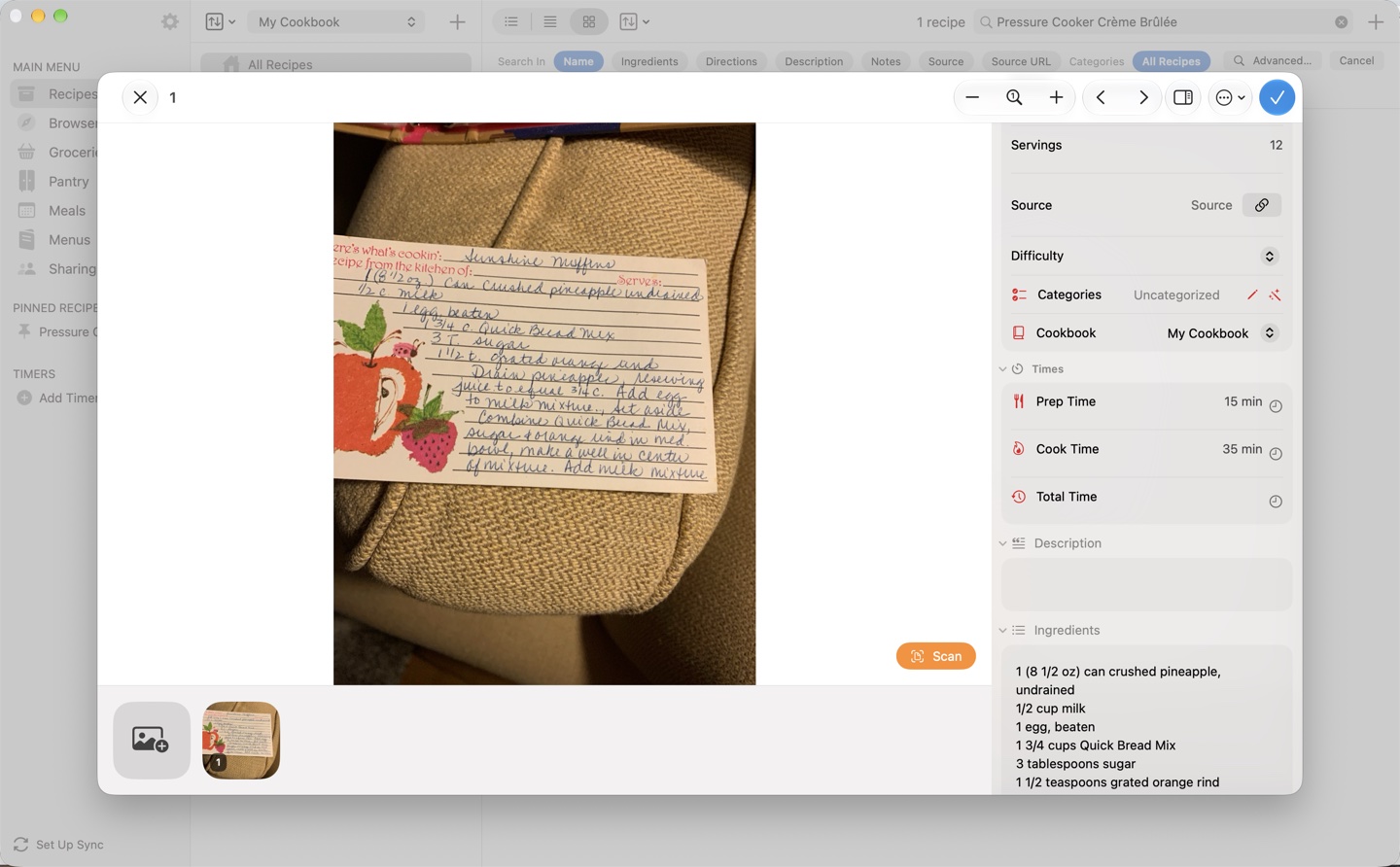
Crop each photo so that only the recipe text is included. To crop or rotate a photo before scanning, open the … (More) menu and choose Edit. Use the rotate and crop buttons, then press Done. When you're ready, press . Paprika will process the photos and present the recognized recipe for review.
Editing a Scanned Recipe
After scanning, the recognized text is sorted into the recipe's fields — name, ingredients, directions, and so on — and displayed alongside the original photo. Compare the result against the photo, correct anything the scan missed, and press to add the recipe to your collection.
Shortcut To copy text straight from the photo, choose Select Text from the … menu, then select the text and copy it into a recipe field. This is handy for fixing up any sections the scan placed incorrectly. Select Text needs macOS 26 or later.
To remove a photo from the scan, right-click its thumbnail and choose Delete. To start over, choose Reset from the … menu. This clears the recipe's text and details, but your photos stay.
Scanning Tips
- For best scan quality, pick a high-resolution image with clear, readable text.
- Make sure the page is evenly lit and the text isn't distorted by the curve of the page.
- Crop out surrounding text (like other recipes on the same page) so only one recipe is scanned at a time.
Note
Scanning sends your photos to Paprika's servers for text recognition. When Paprika can't read a photo the usual way, for example when you're offline, it reads the text with a simpler method instead. A notice then asks you to check fractions, quantities, and multi-column layouts, and tries the photo once more.
Table of Contents
- Introduction
- What's New
- Beta Testing
- Overview
- Adding Recipes
- Scanning Recipes
- Browsing Recipes
- Editing Recipes
- Viewing Recipes
- Nutrition
- Categories
- Cookbooks
- Browser
- Groceries
- Pantry
- Meals
- Menus
- Sharing
- Settings
- Extensions
- Resources