New versions of Paprika for Mac and iPad are available today.
The updated iPad version improves iOS 6 compatibility, and fixes several crashes when using the web browser under iOS 6.
If you’re running iOS 6 on your iPad, please make sure you update to Paprika v1.6.3.
iPad v1.6.3
Bug Fixes:
Improved iOS 6 compatibility.
Fixed several crashes when using the web browser under iOS 6.
Improved performance when searching large recipe collections.
Fixed sporadic crash when editing meal plans via the meal planner.
Mac v1.3.3
Bug Fixes:
Fixed bug where emails would sometimes get cut off.
Fixed bug where recipe scaling sometimes would not update.
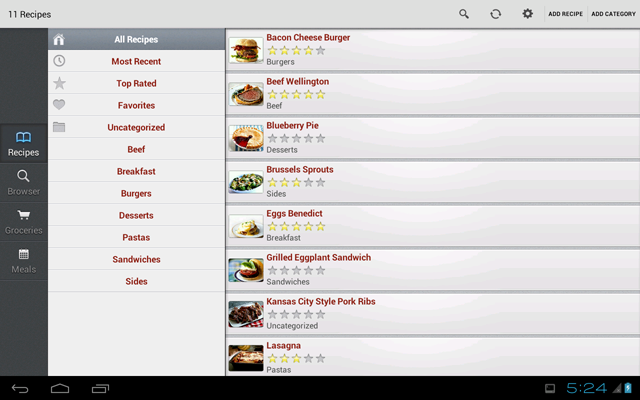
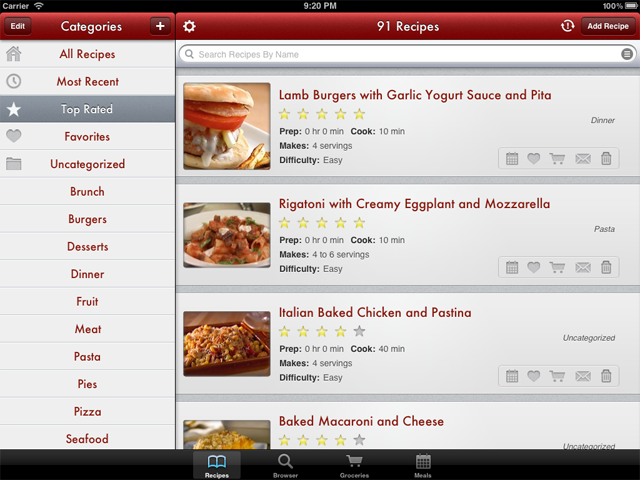
First and foremost, we have redesigned all of the artwork to include full retina display support for the new iPad. Here’s a peek at what it looks like:
As you can see, we have made a few subtle tweaks to the user interface to make the iPad app more consistent with the other versions of Paprika. In particular, we have extended the recipe rows all the way to the sides like we do in the Mac and iPhone versions.
Also, notice the new Top Rated category, which sorts your recipes by their star rating.
For users with many recipes, you can now enable an alphabetical index bar to help you quickly scroll through the recipes list. This can be turned on in the Settings panel.
Finally, we have also added a condensed recipe listing which you can access by pinching the recipe rows to shrink them. Prefer the old look? Just zoom back out to restore their normal size.
Recipe Screen
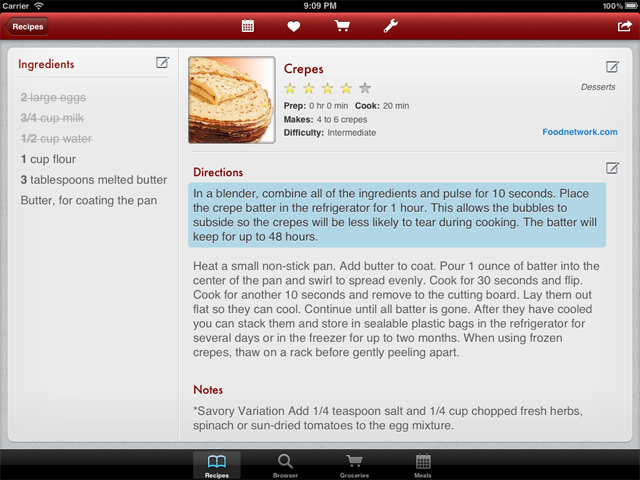
We have also made several user interface tweaks to the recipe screen, here’s a look at the new version:
Notice that we got rid of the old ugly actions bar, and moved the primary recipe actions into the toolbar.
Also introduced in this update are ingredient marking and direction highlighting. Simply tap one of your ingredients to cross it off, so you can easily keep track of what ingredients you have already used. Same for directions, tap to highlight your current paragraph, so you can more easily keep your place while cooking.
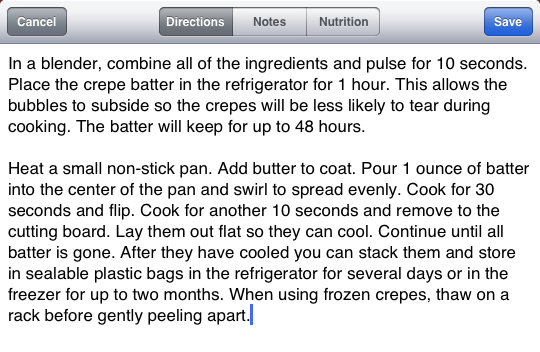
In the previous version of Paprika, the buttons for editing notes and nutrition were in a bit of an awkward location. We have moved them to the same editing panel as the directions - a more intuitive location that better matches how they are displayed.
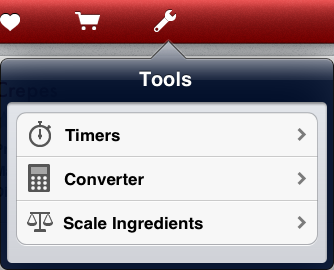
Tools
The recipe toolbar now contains a tools button, which replaces the previous timer button. The tools button allows you to start multiple timers, access a simple unit converter, and scale your recipe’s ingredients.
Meal Planner
To make the meal planner easier to use, we have added support for a new gesture that allows you to change the currently selected week by swiping left and right between weeks.
Additionally, you can now customize the start day of the week in the Settings panel.
Finally, when you open a recipe from the meal planner, closing the recipe returns you directly to the meal planner, instead of navigating you back to the recipe screen.
Accessibility
In order to make sure Paprika is accessible to vision-impaired users, we have gone through the app and made sure every screen is compatible with VoiceOver.
Internationalization
We have updated Paprika with translations for 15 different languages, so users can now natively run the app in the following languages: English, French, Spanish, German, Chinese, Czech, Danish, Dutch, Finnish, Hungarian, Italian, Japanese, Norwegian, Portuguese, Swedish.
Other Improvements
You can now export your entire recipe collection to HTML.
Bookmarks will now sync via Paprika Cloud Sync.
We have improved the email and print formatting for recipes, grocery lists, and meal plans.
Added a Clear Purchased button to the grocery list.
You can now remove a recipe’s existing photo.
Bug Fixes
Fixed issues scrolling the text box when you are editing the ingredients or directions.
Fixed problems some users were having when upgrading from earlier versions of the app.
The ingredient scaling and grocery list now correctly understand fraction characters.
There are numerous additional bug fixes and memory management enhancements that are too obscure to be mentioned here, but suffice to say that the changes should make the app more stable and run more smoothly than before.
Thanks for all of your support, and stay tuned for more!